


Ring og hør
TYNDE KLIENTER! – HVAD ER FORDELEN?
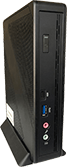
Innovative, pålidelige og sikre. Vi leverer de rigtige løsninger til din virtuelle verden, som understøtter din forretning. Vi gør det nemt at implementere og vedligeholde terminaler, uanset om det er globalt eller lokalt.
TYNDE KLIENTER! – HVAD ER FORDELEN?
Innovative, pålidelige og sikre. Vi leverer de rigtige løsninger til din virtuelle verden, som understøtter din forretning. Vi gør det nemt at implementere og vedligeholde terminaler, uanset om det er globalt eller lokalt.
KONTAKT OS – VI KAN HJÆLPE DIG!
Hos Nextsystem er vi klar til at hjælpe dig og din virksomhed med tynde klienter.
Kontakt os i dag, og find ud af hvad vi kan gøre for dig.
VED DU AT…

Hvorfor bruge tynde klienter?
“Forbedringer af remote display protokol teknologi omkring tynd klient virtualisering har skabt en ny generation af virtuelle applikationer, som for første gang kan afvikles effektivt på andre enheder end PCere” (Patrick Irwin, Citrix).

2 skærme kan øge produktiviteten.
“Ved at bruge én stor eller to skærme arbejdede brugerne helt op til 52 procent hurtigere end før og sparede op til 2.5 time pr. dag” (The University of Utah).

Markedet for tynde klienter vokser
Antallet af leverede PCere falder, antallet af tynde klienter stiger. I 2013 blev mere end 6 millioner tynde klienter leveret globalt, et antal der forventes at stige til mere end 9 millioner i 2017.

Vores løsning kører på 1.000.000 terminaler
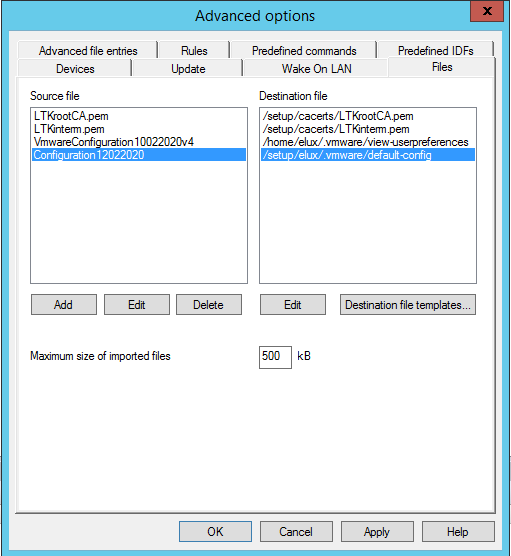
Mere end 1.000.000 tynde klienter i 45 lande har eLux som OS og styres centralt med Scout Enterprise Management.

Verdens største installation er eLux
FinanzInformatik, som er IT-service provider til de tyske sparekasser (Sparkassen) er ansvarlig for drift og management af mere end 220.000 tynde klienter med eLux og Scout.
SUPPORT
| Telefon support (CET) |  Product downloads Product downloads |
| Mandag til torsdag 8:30-16:30 |  Se FAQ Se FAQ |
| Fredag 8:30-16:00 |  Ring +45 20 260 261 Ring +45 20 260 261 |
NEXTERMINAL NYHEDSBREV
Bliv opdateret omkring udviklingen indenfor tynde klienter.
NYHEDER HOS NEXTERMINAL

HVAD SIGER VORE KUNDER?
SALLING GROUP

Jeg har haft fornøjelsen af at samarbejde med Nextsystem A / S gennem vores imageopdateringsproces på over 4000 terminaler i fire lande. På trods af udfordringer, på grund af nogle specifikke interne krav, har Nextsystem altid været der for at støtte os næsten øjeblikkeligt, skræddersy og finde ud af ikke-standardiserede måder at imødekomme vores individuelle IT-behov. For hver eneste udfordring, har Nextsystem fundet en løsning. I de mest afgørende dele af opdateringen var Jan Kaspersen der personligt. Det har været en meget positiv oplevelse fra start til slut - du ved bare, at denne virksomhed ved, hvad den gør hele vejen igennem, og du bliver aldrig ladt i stikken med de problemer, der uundgåeligt kan opstå under sådanne opgaver. Jeg kan varmt anbefale Nextsystem A / S som løsningsudbyder
Jędrzej Zydroń-Robakowski, IT Desktop Specialist, Salling Group
COOP
 Det har været mit privilegium at arbejde med Nextsystem A / S i 5 år. I løbet af denne tid har Jan Kaspersen konsekvent bevist sin værdi som en ekstraordinær dygtig it-infrastruktur specialist og rådgiver. Når det kommer til RDS, Citrix eller tynde klientrelaterede problemer eller krav, ville jeg ikke ringe til nogen anden. Det ville være spild af tid.
Søren Vendler, IT-architect Coop Teknologi IT Operations
DANSK MILJØ- OG ENERGISTYRING A/S
 Vi vil fra DME A/S udtrykke vores tilfredshed med jeres support og produkter. Vi får af og til rodet os ud i nogle kringlede situationer, med specielle krav og ønsker, og vi har altid fundet frem til en løsning med jeres hjælp. Stor ros for faglig kompetence og venlighed. .
Jesper Trelborg, Developer
ED DATA
 I de 10 år vi har arbejdet sammen med Nextsystem A/S, har vi igennem spændende sager og en tæt relation fundet samarbejdet med NextSystem A/S særdeles positivt for vore slutkunder. Vi ser hvordan markedet hele tiden er i bevægelse. Kundernes efterspørgsel efter stadig mere individuelle og fleksible løsninger stiller krav til os som forhandler og til vore samarbejdspartnere. Nextsystem A/S har forståelse for denne dynamiske proces og er en meget stærk og kompetent teknisk sparringspartner, som virkelig bibringer merværdi over for kunderne.
Henrik Bjerrum Nielsen, Salgschef
DATAFACILITY APS
 Hos mange af vore kunder er vi den ”eksterne” it-afdeling, og det er en naturlig del af vores samarbejde, at vi ikke kun kan træffes ”i normal arbejdstid”. Dette stiller selvfølgelig nogle krav til os, men dem prøver vi at leve op til. Dette gør også, at vi må vælge nogle leverandører fra til visse opgaver, da vi ikke kan få kompetent support og ikke kan træffe supportere. Jeg har igennem mere end 6 år arbejdet sammen med Nextystem og altid følt, vi har fået en kompetent service og support. Opgaverne er altid blevet fuldt til dørs, og Jan Kaspersen og hans team har altid ydet en fortræffelig support. For mit vedkommende er det den gode support, der er ydet ud over det sædvanlige, jeg husker Nextsystem for, og jeg kan kun anbefale virksomheden til andre.
Søren Højberg, Owner
UNITED IT
 IT er en tillidssag – derfor bruger vi Nextsystem A/S. I alle projekter vi har været igennem, har vi altid fået seriøs og meget kompetent rådgivning. Selv når tingene har brændt på og der har været behov for support på skæve tidspunkter og til udfordrende problemstillinger, har I altid stillet op med god og yderst kompetent rådgivning. Tillid er vigtig – derfor bruger vi Nextsystem A/S til vores tynde klient løsninger. Mine varmeste anbefalinger til Jan Kaspersen & Teamet bag Nextsystem A/S.
Thomas B. Thomsen, CEO
A/S PEDER NIELSEN BESLAGFABRIK
 PN-BESLAG kender kun Nextsystem A/S som en troværdig og dygtig samarbejdspartner. Vi modtager altid kreative og konstruktive løsningsforslag til enhver udfordring og bliver aldrig spist af med en halv forklaring. Derfor er Nextsystem A/S en samarbejdspartner, vi kan stole på. Vi ved nemlig, at vore henvendelser bliver behandlet på en kompetent måde, så vi altid ender op med fuldstændig afklaring på problemet. Nordjyder er som bekendt et prisbevidst folkefærd, og også her lever Nextsystem A/S op til vore forventninger. Vi vil til enhver tid helt klart anbefale Nextsystem A/S.
Allan Holm Christensen, IT afdelingen
BRÜSCH PRECISION A/S
 Hos Brüsch Presision A/S har vi kendt Nextsystem A/S siden 1996, Det bemærkelsesværdige ved dette firma er den loyalitet, der udvises for vores pengepung. Vi har flere gange oplevet at ville købe noget, hvor nextsystem A/S har frarådet os at foretage investeringen.Vi står her og vifter med pengene, og så vil de slet ikke have dem - se det er en rigtig leverandør!. På det tekniske niveau har vi intet at udsætte, hvor vi i de sidste 7-8 år har haft tynde klinter både i administrationen og produktionen. Nextsystem A/S har sat hele installationen op, både server & terminaler, og det kører perfekt. Jeg har selv været programmør i en lang årrække og jeg kan godt se, hvem der er gode på teknik & kompetence. Nextsystem A/S ligge helt klart i den helt rigtige ende af skalaen. Når vi får et tilbud fra Nextsystem A/S, er vi aldrig bekymret over, om vi bliver taget ved næsen, eller om det er den rigtige løsning. Vi har 100% tillid til, at der er ydet det bedste. Det blive et Ja tak, også næste gang
Jakob Brüsch, Direktør
FTZ AUTODELE&VÆRKTØJ A/S
 Hos FTZ består hovedparten af vores arbejdspladser af tynde klienter og vi har ca. 800 stk. Samtlige af dem er købt igennem Nextsystem og hovedparten af de første 100 vi købte for ca. 10 år siden, kører stadig væk! Vi har af flere omgange prøvet specielle ting af, og hver gang vi har spurgt om hjælp til disse specielle ting, har vi eksperten i røret efter få minutter. Også hvis vi har haft et uforklarligt problem eller skal høre om nye produkter, har vi tit haft besøg af Nextsystem A/S's team. For vores vedkommende har det været essentielt med en partner, der er så engageret i alt, hvad der har med tynde klienter at gøre. Som en af Nextsystems A/S større kunder, kan vi varmt anbefale dem til andre!
Allan Persson, IT afdelingen
FLCONSULT APS
Vi har siden 2001 handlet med Nextsystem og gennem alle år altid oplevet en leverandør med fuld fokus på hurtig og kompetent rådgivning og de er med på nyeste software og ”mode” indenfor deres område. De er altid friske på at hjælpe med det akutte problem og den mindre detalje, der lige skal finpudses. De eventuelle småfejl, som vi i vores arbejde med IT oplever ind imellem, har de allerede løsningen på, når vi kontakter dem. Vi oplever præcis den samme behandling, uanset om vi køber kun et enkelt eller flere af deres produkter. Vi anser dem for et meget specialiseret ”nørd”-team i ordets bedste betydning. Jeg vil derfor til enhver tid anbefale dem og deres fleksible firma.
Jesper Antonsen
LYNGBY-TAARBÆK KOMMUNE

Det har altid været en stor fornøjelse at samarbejde med Nextsystem A/S. Hver gang vi har haft en mindre udfordring. Har Nextsystem A/S altid været klar til at supportere os. Vi har sammen fået sat et ekstremt bæredygtigt og stabilt miljø op. Der til dagligt sørger for flere hundrede medarbejdere kan arbejde. Det er utroligt så let de tynde klienter gør det at rulle nye indstillinger ud til alle medarbejdere. Det er fedt at der ikke ligger nogen data på de tynde klienter og man kan give brugeren de programmer som de skal bruge. Hvor det førhen tog en hel dag at formatere og geninstallere computere har vi nu fået det ned på få minutter. Dette gør vi kan bruge tiden på at løse og supportere andre opgaver. Vil give min varmeste anbefalinger af Nextsystem A/S til alle som leder efter en smart løsning.
Niclas Schulze Andersen, IT Supporter, Lyngby-Taarbæk Kommune
VORDINGBORG KOMMUNE
Siden første møde med NextSystem har kemien været lige i skabet – et vigtigt parameter for at få en god implementering. Om du har 5 terminaler eller 100 – servicen er den samme, og du kan være sikker på at Jan ikke helmer før end eventuelle udfordringer er løst – om det så tager hele natten. Det er heldigvis sjældent, for de har styr på det hos Next! Priserne er konkurrencedygtige og hardwaren lige i skabet. Vi har været og er fortsat meget tilfredse med vores beslutning om at migrere fra en konkurrerende terminal udbyder til Next.
Mads Skarnager, Digitaliseringskonsulent Vordingborg Kommune
Royal Unibrew A/S
Min rejse med Nextsystem A/S startede helt tilbage i 2008, da jeg stod overfor valget om at skulle overgå fra tykke klienter til tynde klienter på hele vor OT system i produktionsmiljøet på Faxe Bryggeri. Jeg søgte efter et ekstremt stabilt, hårdført, skalerbart, intuitivt, overskueligt samt prisbilligt produkt med en god support, og efter en kort introduktion af Nextsystem A/S og hele deres smarte setup, var jeg ikke et sekund i tvivl om hvem jeg skulle vælge som min fremtidige samarbejdspartner i denne forbindelse. Og jeg har absolut heller ikke fortrudt dette valg på noget som helst tidspunkt – hele systemet fra Nextsystem A/S har efterfølgende kørt fuldstændigt upåklageligt og helt uden nedetid! Jan Kaspersen har hele vejen igennem givet mig den mest ultimative og bedste support en kunde på nogen måde kunne ønske sig, og han giver aldrig op før eventuelle udfordringer er løst 100% tilfredsstillende! Her får man virkelig enormt meget valuta for pengene og jeg har efterfølgende sparet enormt meget dyrebar tid, penge og ressourcer, på ikke at skulle drifte de tykke klienter – i dag kan jeg klare det hele fra skrivebordet med et minimum af tidsforbrug. Jeg kan derfor kun på det varmeste og kraftigste anbefale Nextsystem A/S, samt alle deres produkter og hele deres fantastiske smarte setup.
Jakob Agerbo Bach, Maintenance manager Brewing & Utilities
Lasertech A/S

Vores samarbejde med Nextsystem begyndte tilbage omkring årsusindskiftet. Hvor Jan Kaspernsen hjalp os med at installere elux på nogle gamle tynde klienter fra Fujitsu Siemens, der havde kørt windows. Hurtigt fandt vi ud af vi havde behov for nogle mere moderene klienter med bedre grafikkort. Så nu har vi været igennem nogle generationer af Nextstation. Noget at det bedste er når man ringer til Nextsystem, så får man både råd og vejledning, selvom det nok ikke nyt hardware du har brug for. Jeg ved godt vi kører X via XDMCPsom nok ikke mange gøre, men Jan er også skarp lige i nuet når man har problemer med selv så gamle systemer. Der kan gå 6-8 år imellem vi har kontakt men den gode service er den samme.
Klaus F. Østergaard
Frederikshavn Forsyning
Vi har de sidste mange år afviklet vores arbejdspladser via citrix på en elux baseret hardwareplatform leveret fra Nextsystem, og i samtlige år har disse terminaler leveret varen. Disse tynde klienter er alle administreret via en scout server installation, på den måde bliver løbende vedligeholdelse ikke lettere. Vi har brugt Nextsystem til service, support, fejlsøgning og optimering således at vores brugere får den optimale oplevelse af miljøet. Jeg kan kun give nextsystem min varmeste anbefaling.
Morten Steen, IT manager



